Header Format
When Game Tables processes a value in a table cell, it needs to determine to which property of which object the value should be applied. To do so, it checks the content of the row and column headers corresponding to the cell.
As a general rule, you can think of a row header as locating the object, and a column header as locating the property within that object.
| You can flip the table by setting GameTable’s Orientation to Object Per Column. For simplicity, this documentation assumes that the default value of Object Per Row is used. If you use a different setting, just read “row headers” as “column headers” and vice versa. |
Row Header
The full syntax of a row header is the following:
Prefab Name / Game Object Name / <Component Type> Property Prefix
The only required component of a row header is Prefab Name. The rest can be omitted.
Examples:
PlayerBig Soldier / GunYellow Car / Front Left Wheel / <Rigid Body>Plasma Gun / <Shooter> Patterns[0].Offset
Notice the use of separators in the examples above. They must be used after Prefab Name and Game Object Name when specifying subsequent components.
Column Header
The full syntax of a column header is the following:
Game Object Name / <Component Type> Property Path
The only required component of a column header is Property Path. The rest can be omitted.
Examples:
Health<Clip> AmmoSpawn Point 1 / <Spawner> Offset.X
Combining Row and Column Headers
To locate a property in the project, Game Tables combines the row and column headers of each cell:
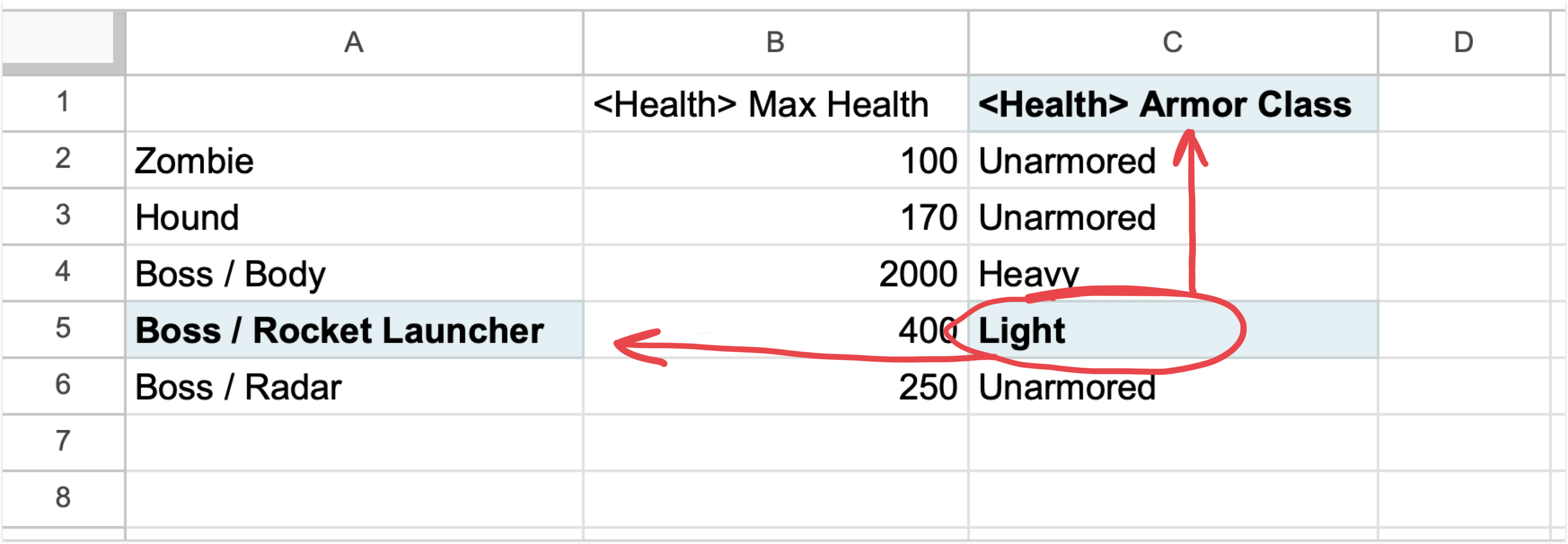
The combined header of the encircled cell is Boss / Rocket Launcher / <Health> Armor Class.
This combined header is used to locate the object’s property in the project. Game Tables gives you some flexibility in how the required information can be split between row and column headers. For example, the following combinations of different row and column headers all point to the same object property:
| Row Header | Column Header |
|---|---|
| Player / Gun / <Clip> Bursts[0] | Pellet Count |
| Player / Gun / <Clip> | Bursts[0].Pellet Count |
| Player | Gun / <Clip> Bursts[0].Pellet Count |
The combined header must adhere to the following rules:
- The same component can only be present in either row or column header, but not both. For example, if the row header contains a Component Type, the column header cannot also contain it. The exception to this is Property Path. If this component is present in the row header, it is treated as a prefix for the column header (see the first example in the table above).
- The column header must be at least as specific as the row header. For example, if the row header contains a Component Type, the column header cannot contain a Game Object Name as it is less specific than a Component Type.
Essentially, header components can only appear in the following order in the combined header:
- Prefab Name
- Game Object Name
- Component Type
- Property Path
Header Components
There are four types of components that may be used in row and column headers: Prefab Name, Game Object Name, Component Type and Property Path.
The only required components that any cell should contain are Prefab Name and Property Path.
Prefab Name
Prefab Name locates a Prefab or a ScriptableObject in the project. Game Tables searches for an asset with this name recursively, starting from the directory specified by Search Path.
Game Object Name
Game Object Name locates a GameObject within a Prefab. Game Tables searches for a GameObject with this name recursively, starting from the Prefab’s root GameObject.
| Game Object Name is only applicable to Prefabs and should not be used with ScriptableObjects. |
Component Type
Component Type helps locate a Component within a GameObject. Since the same property name may appear in more than one component on the same GameObject, you may want to specify the component type in order to avoid ambiguity. If Component Type is specified but Game Object Name is not, the required property and component combination will be sought in all GameObjects of a prefab.
| Component Type is only applicable to Prefabs and should not be used with ScriptableObjects. |
Property Path
Property Path locates a specific Property within a Component or ScriptableObject.
A dot separator can be used in a Property Path to denote nested properties, e.g.: Position.X. When referencing nested properties, upper levels of the name hierarchy can be omitted, provided the path is still unambiguous. For example, property Price.Gold can be referenced as just Gold, if this name matches exactly one property in the target object.
A Property Path can contain array indexers: SpreadPattern[0].Offset, or even wildcard indexers. The latter can be used to specify multiple items without referencing each individual one: SpawnDelays[*]. See Arrays for more information.
Case and Whitespace Insensitivity
All the header components are both case- and whitespace-insensitive. For example, the following two paths are the same from Game Tables’ point of view:
Cluster Mine / <Spreading Spawner> Targets [ 0 ] . Offset . Xclustermine/<spreadingspawner>targets[0].offset.x